
Today, we would like to inform you about two new important features in our app that will make check-ins smoother and more secure for both you and our members.
1. Location-Assisted Check-in
We’re adding a smart, simple feature called Location-Assisted Check-in to work alongside our existing QR-code system.
Starting December 1st, members need to grant geolocation permission (GPS) in their Urban Sports Club app settings to successfully scan the QR-code. This extra layer of security helps ensure check-ins are accurate and fair.
What’s the benefit for you?
- Increased security: No more empty spots in your classes due to fraudulent check-ins.
- Faster check-ins: For instantly booked classes with a new one-tap to check in option when they’re at your venue.
- Better visibility: Members in your local area will see your venue location more clearly.
What changes for members?
Members simply need to enable location services for their Urban Sports Club app. They’ll only see the check-in button in the app if their location matches your studio’s exact address (specified in Partner Portal). If a check-in doesn’t work, just ask them to check if their location services are enabled.
Is the QR code process changing?
No, the check-in process stays the same. Members will still scan the QR code in order to check in successfully. The location check happens only on the members’ device before they can scan the QR code.
What do I have to do?
Please make sure your location details are up-to-date on the Urban Sports Club platform:
- Log in to your Partner Portal account
- Go to Studio > Location > Choose your location
- Make sure the pin on the map exactly matches your location (where members scan the QR code). Otherwise, members will not be able to check in
The location-assisted check-in will be launching on December 1st. In the future, members who are not physically present at the check-in location (your studio) when checking in, may be blocked from doing so.
2. Updated Check-in Confirmation Screen
Starting December, the design of the check-in confirmation screen in the app will change. This is an update that will give us more opportunities for future improvements and provide a smoother process.
The characteristics of a valid check in have not changed. A valid check in can be identified by:
- The green background.
- The member’s profile picture and name are visible.
- The circle around the profile picture moves.
- The venue and activity name are shown.
- The check-in date and time, plus a time counter since the check-in.
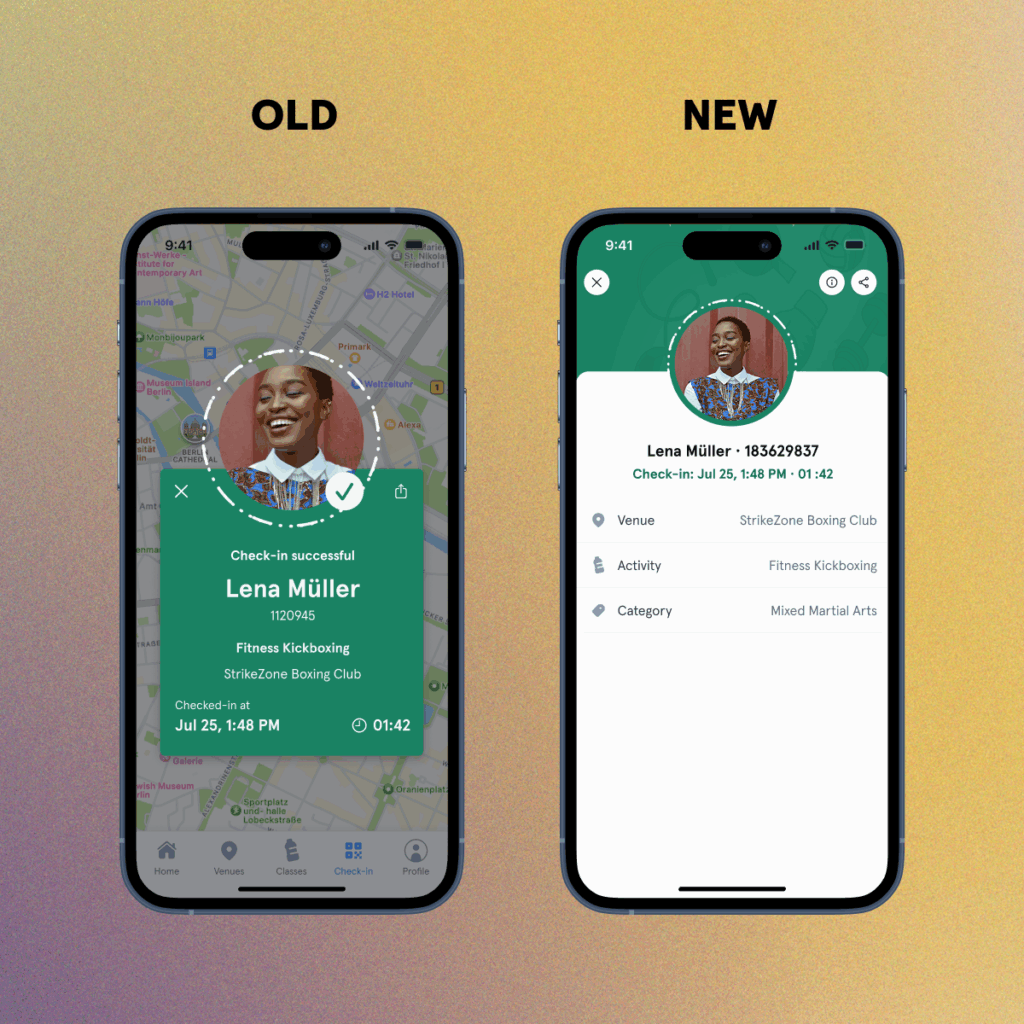
ℹ️ The updated check-in confirmation screen will be launched together with the location-assisted check-in on December 1st. The old confirmation screen is still valid for now. There will be a transition period where some members may still show the old screen. An invalid check-in will be easy to spot, it’ll show up in a red dialogue box with the reason it failed.
If anything is unclear, just reach out to our Partner Support Team via the contact form in the Partner Portal or Help Center.